tp
Developer Guide
- Acknowledgements
- Design
- Implementation
- Appendix
- Non-Functional Requirements
- Glossary
- Instructions for manual testing
- Initial Launch
- Adding a book
- Deleting a book
- Listing books
- Borrowing a book
- Returning a book
- Listing overdue books
- Listing borrowed books
- Listing members with overdue books
- Searching books
- Viewing book quantity
- Listing books on a shelf
- Viewing library statistics
- Undo last valid command
- Exiting the application
- Additional test cases
- Handling missing/corrupted data files
Acknowledgements
LeBook uses the following libraries:
Design
Architecture
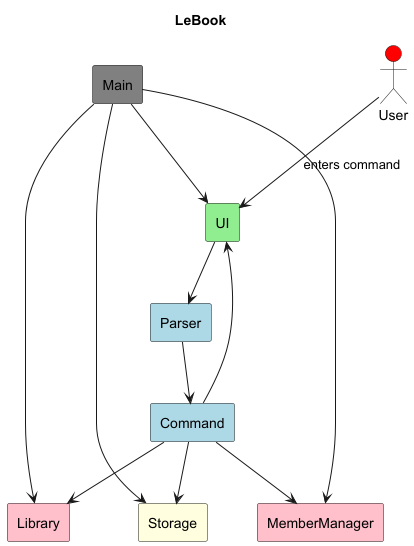
Main Components of the architecture:
Ui: The Ui of the system.Parser: Process User Input.Command: Executes instructions based on commandType.MemberManager: Library members.Storage: Reads data from, and writes data to, the hard disk. Data includes book details and borrower.Library: Manages global catalogue and shelves, as well as aUndoManagerfor undoing of a command.
Parser component
API: Parser.java
Shown below is a simplified class diagram of the Parser component:
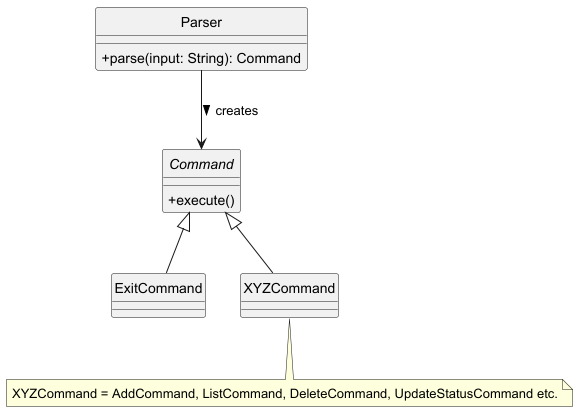
The parser component is responsible for interpreting user input and calling the appropriate command object. It takes a string input from the user, determines the corresponding command type, and returns an instance of a subclass of Command.
How the parser component works:
- Extracts the command keyword from the user input.
- Matches the keyword to the relevant commands.
- Parses and extracts the remaining arguments (if any).
- Returns a corresponding Command object for execution.
Command component
Overview
- All commands extend the Command class, which is abstract and defines the execute() method.
- The execute() method in each command class contains the logic to perform a specific action.
- Each command interacts with Library (to manage catalogue and shelves), Ui (to print messages), and Storage (to save data to a file).
Storage component
API: Storage.java
- Overview
- The
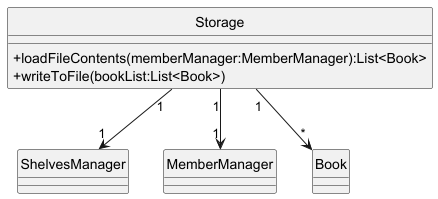
Storageclass in LeBook is responsible for saving the data after the user exitsLeBook. To load the data when the user launchesLeBook, it reads data from a file and loads it into a list. When exiting the program, it writes the Books back into the file in a specific format.
- The
- Design
- Each
Bookis stored in structured text using a|delimiter. - Each time the user exits the program, the file is overwritten, ensuring that the content is up to date.
- If the file to save the data does not exist, an empty list is returned. Exceptions are caught and logged.
- If the file is tampered with, the program is notified, and it automatically deletes all existing data written in the file.
- Each
Library component
API: Library.java
-
Overview
- The
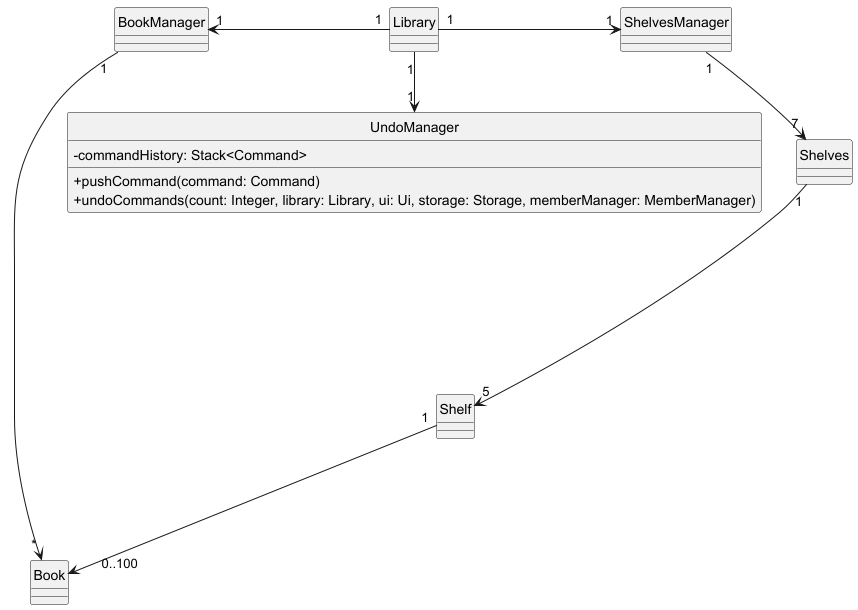
Libraryclass in LeBook handles the job of managing all book-related operations. It contains aBookManagercalled catalogueManager, aShelvesManagerto manage the books on shelves, as well as aUndoManagerto facilitate undoing of past user interactions. - Whenever a book-operation comes e.g
add, both the global catalogue of books and the shelves will be modified. (In this case, the book is added to the global catalogue and the relevant shelf based on itsGenre).
- The
-
Design
catalogueManager: manages the global catalogue (e.g adding / deleting).ShelvesManager: manages shelves of different genres. The same book in the global catalogue is also stored in their respective shelves.UndoManager: undo certain user commands likedeleteandaddwhen prompted.
Class Diagram (Library):
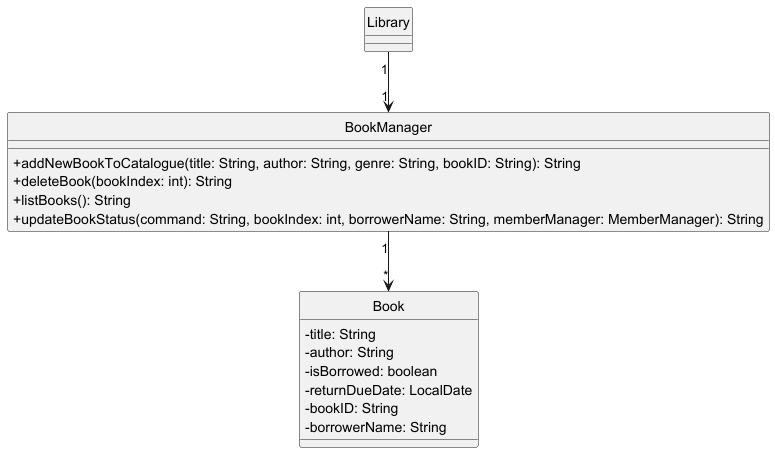
BookManager
The BookManager class is responsible for managing the library’s global catalogue of books. Within the Library class, it is referenced as catalogueManager.
It handles core operations such as:
- Adding a book to the catalogue
- Deleting a book from the catalogue
- Listing all books in the catalogue
- Borrowing and returning books
- Providing data for statistics and search functionalities.
Class Diagram (BookManager):
ShelvesManager
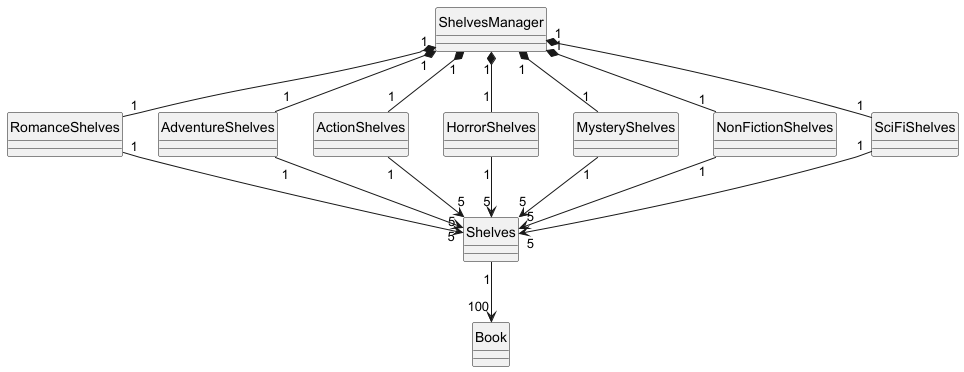
The ShelvesManager class is responsible for managing the Shelves. ShelvesManager contains sections, divided based on the genre of the book added. In each section, there are 5 Shelf objects, and each Shelf contains 100 Books.
It handles core operations such as:
- Adding a book to the Shelf
- Deleting a book from the Shelf
- Listing a specific Shelf
Class Diagram(ShelvesManager):
Ui component
API: Ui.java
-
Overview
- The
Uiclass in LeBook is responsible for all user interaction in the Command Line Interface (CLI). Uihandles:- Displaying welcome, help and exit messages.
- Reading user input and returning the raw command string.
- Printing success and error messages in a standardized and formated way.
- Displaying book lists in formatted layout.
Uiclass is designed as a Singleton to ensure only one instance manages all user interaction throughout application’s cycle.
- The
-
Design
- Singleton pattern:
Uiprovides static instance viaUi.getUiInstance()and uses private constructor to prevent multiple instances. readCommand()-> Reads user input from terminal.printWelcomeMessage(),printHelp(),printExitMessage()-> Prints standardized success messages.printSuccess(String message)-> Prints standardized success message.printError(String message)-> Prints standardized error messages.printWithSeparator(String message)-> Prints message surrounded by separators.showBookList(List<Book> books)-> Displays formated list of books with their details.
- Singleton pattern:
Implementation
Add Book Feature
The add book feature allows librarians to add a book to the catalogue. When the librarian wishes to add a book, the book
is added to the global catalogue in BookManager, and also concurrently added to the shelf in ShelvesManager.
The feature is facilitated by the following components:
AddCommand: A command object that encapsulates the logic for adding the book to the catalogue and shelf.Library: Responsible for managing theBookManageras well as theShelvesManager.ShelvesManager: Responsible for sorting the books into the correct genre.Shelves: Responsible for checking the appropriateshelfto add the book to.
Key Methods
getSuitableIndex()inShelf:- Iterates through all the slots in the shelf.
- Check for a suitable spot on the shelf.
The spot is suitable if:
- A book that was in that spot and previously deleted.
- The spot was never occupied.
Execution Flow
- The librarian enters a string input
add <Book Details>. - The Parser class parses the input and creates a
AddCommand. - The
executemethod inAddCommandclass callsLibrary’saddNewBookToCatalogue(<Book Details>)andaddNewBookToShelf(<Book Details>)method. - The
ShelfManageriterates through its shelf indexes, checks for open slots. - The result is passed to the Ui, which displays it to the user.
Sequence Diagram
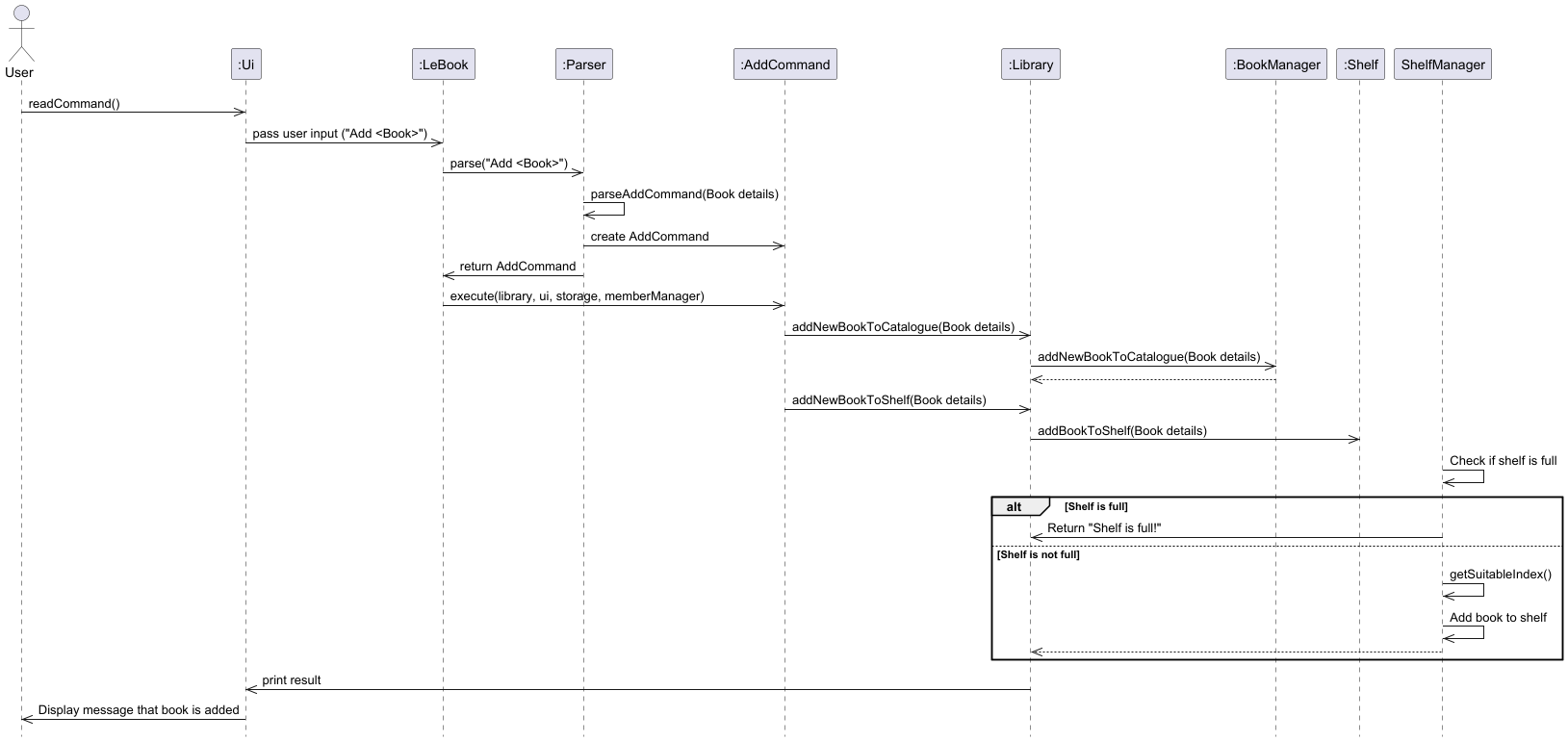 Note: The
 Book Details consists of the Title, Author Name, as well as the genre.
Delete Book Feature
The delete book feature allows librarians to delete irrelevant books from the library using their bookID, their unique title and author or their bookIndex.
Each delete command also supports undo, restoring the last deleted book into the system.
Key Methods
-
deleteBook(int bookIndex)inLibraryDeletes a book based on its index in the global catalog list.
- Input by user:
delete num / 0 - Retrieves the book ID using the bookIndex
- Delete book from global catalog using bookIndex
- Removes book from its corresponding shelf using the book ID (replaces with a dummy book).
- Returns a String to indicate book deletion.
- Input by user:
-
deleteBook(String bookTitle, String author)inLibraryDeletes a book based on its title and author in the global catalog list.
- Input by user:
delete bk / The Hobbit / J.R.R. Tolkien - Retrieves bookIndex and bookID using title and author
- Delete book from global catalog using bookIndex
- Removes book from its corresponding shelf using book ID(replaces with a dummy book).
- Returns a String to indicate book deletion.
- Input by user:
-
deleteBook(String bookID)inLibraryDeletes a book based on its book ID.
- Input by user:
delete id / AC-0-1 - Refer to here for information about the formatting of book ID.
- Retrieves bookIndex using book ID
- Delete book from global catalog using bookIndex
- Removes book from its corresponding shelf using book ID(replaces with a dummy book).
- Returns a String to indicate book deletion.
- Input by user:
Execution Flow
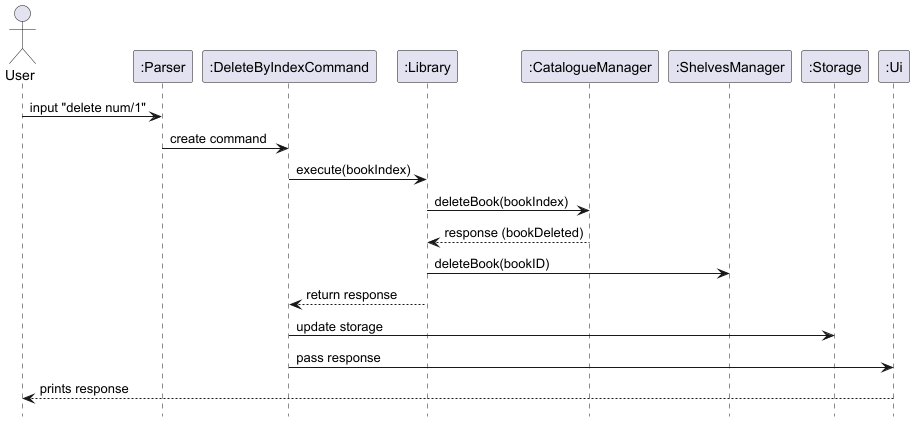
Given below is an example usage scenario and how the delete mechanism behaves at each step.
Assuming the initial state of the library is that there’s one book titled Book1 by AuthorA.
Step 1. The user types in the string input delete num / 1
to delete the 1st book in the catalogue (in this case, it’s Book1).
Step 2. The Parser class parses the input and creates a
DeleteByIndexCommand.
Step 3. The execute method in this command class calls library’s deleteBook(Int bookIndex) method.
Step 4. library calls upon catalogueManager deleteBook(bookIndex) to delete the book from the
catalogue. The response containing information about the bookDeletion is stored in response.
Step 5. library calls retrieves the bookID using the bookIndex and passes it to shelvesManager
which deletes the book from the relevant shelf.
Step 6. Book deletion is complete.
The response is finally returned back to DeleteByIndexCommand which calls Ui to print out the response.
Storage is also updated.
Sequence Diagram (of this example)
List Book Feature
The list book feature allows librarians to see the basic information of the
catalogue in their system. This includes the BookTitle, Author, BookID
and the DueDate if the book was borrowed.
Key Methods
listBooks()inBookManager- List all books in the global catalogue with their respective information including their status, title, author, bookID and due date.
- Input by user:
list
Execution Flow
Given below is an example usage scenario and how the list mechanism behaves at each step:
Assuming the initial state of the library is that there’s one book titled Book1 by AuthorA.
Step 1. The user types in the string input list to list all books in the catalogue.
Step 2. The Parser class parses the input and creates a ListCommand.
Step 3. The execute method in this command class calls library’s listBooks() method.
Step 4. library calls upon catalogueManager’s listBooks() method, stores the response.
Step 5. The response is returned to the command class and printed out by Ui.
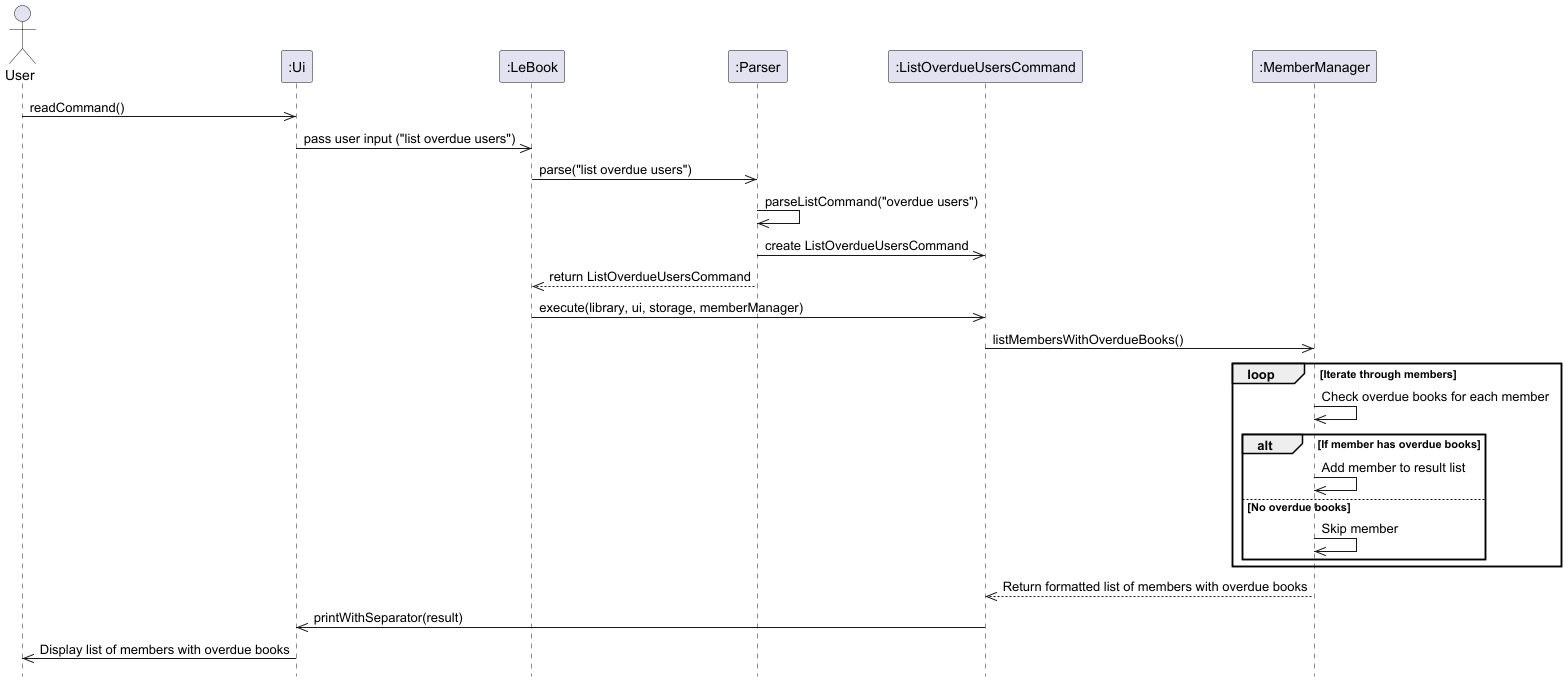
List Members with Overdue Books Feature
The list members with overdue books feature allows librarians to view a list of members who currently have overdue books.
It retrieves data from the MemberManager class, which maintains a list of all members and their borrowed books, and
checks the overdue status of each book.
The feature is facilitated by the following components:
ListOverdueUsersCommand: A command object that encapsulates the logic for listing members with overdue books.MemberManager: Responsible for managing all members and their borrowed books.Member: Represents an individual member and provides methods to retrieve their overdue books.Ui: Displays the formatted list of members with overdue books to the librarian.
Key Methods
listMembersWithOverdueBooks()inMemberManagerclass:- Iterates through all members.
- Checks each member’s borrowed books for overdue status.
- Returns a formatted string listing members with overdue books.
getOverdueBooks()inMemberclass:- Returns a list of overdue books for a specific member.
Execution Flow
- The librarian enters a string input
list overdue users. - The
Parserclass parses the input and creates aListOverdueUsersCommand. - The
executemethod inListOverdueUsersCommandclass calls MemberManager’slistMembersWithOverdueBooks()method. - The
MemberManageriterates through its list of members, checks for overdue books, and builds a formatted string containing the results. - The result is passed to the
Ui, which displays it to the user.
Sequence Diagram
Searching Feature
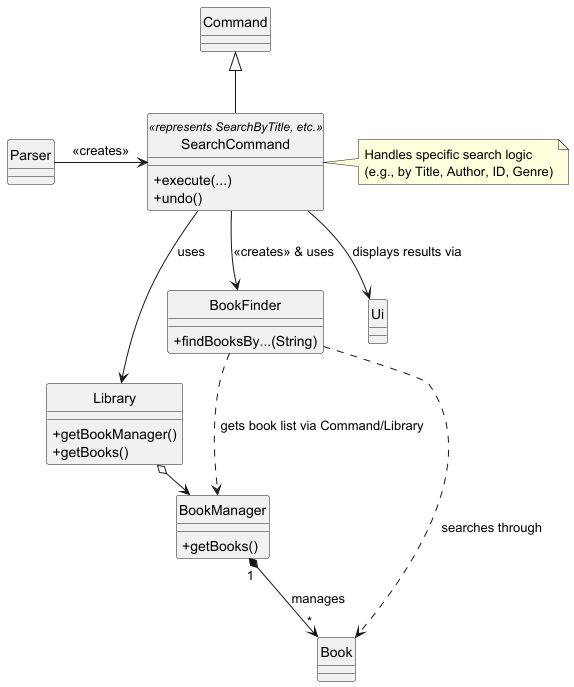
The search functionality is encapsulated within the BookFinder utility class and initiated by specific SearchBy…Command objects (SearchByTitleCommand, SearchByAuthorCommand, SearchByGenreCommand, SearchByIDCommand).
Delegation: Search logic is intentionally separated from BookManager into BookFinder. This promotes Separation of Concerns, making BookManager focused on catalogue management and BookFinder specialized in searching.
Commands & Behavior
- SearchByTitleCommand
- Searches for books where the title contains the specified query (case-insensitive).
Input:find title <title_query>(e.g.,find title Lord of the Rings) - Retrieves book list from
BookManagerviaLibrary - Uses
BookFinder.findBooksByTitle(titleQuery) - Displays matching books via
Ui
- Searches for books where the title contains the specified query (case-insensitive).
- SearchByAuthorCommand
- Searches for books where the author’s name contains the specified query (case-insensitive).
Input:find author <author_query>(e.g.,find author Tolkien) - Retrieves book list from
BookManagerviaLibrary - Uses
BookFinder.findBooksByAuthor(authorQuery) - Displays matching books via
Ui
- Searches for books where the author’s name contains the specified query (case-insensitive).
- SearchByGenreCommand
- Searches for books matching the specified genre exactly (case-insensitive).
Input:find genre <genre_query>(e.g.,find genre adventure) - Retrieves book list from
BookManagerviaLibrary - Uses
BookFinder.findBooksByGenre(genreQuery) - Displays matching books via
Ui
- Searches for books matching the specified genre exactly (case-insensitive).
- SearchByIDCommand
- Searches for a book using the unique Book ID (case-insensitive).
Input:find id <book_id>(e.g.,find id AD-0-0) - Retrieves book list from
BookManagerviaLibrary - Uses
BookFinder.findBooksByShelfId(bookId) - Displays result via
Ui
- Searches for a book using the unique Book ID (case-insensitive).
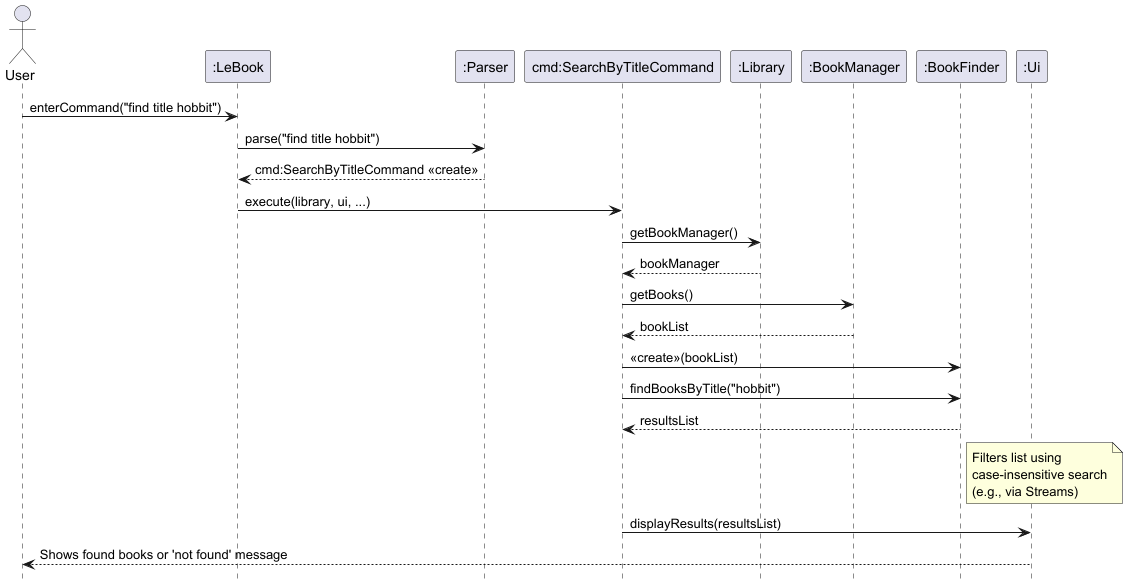
Execution flow:
- The user enters a find command (e.g.,
find title Lord of the Ringsorfind id AD-0-0). - The
Parserinterprets this and creates the appropriate SearchBy…Command object (e.g.,SearchByTitleCommandwith the search term). - During execution (execute method), the SearchCommand:
- Retrieves the
BookManagerinstance via theLibrary. - Gets the current
List<Book>fromBookManager. - Creates a new
BookFinderinstance, passing thebookListto its constructor. - Calls the relevant search method on the
BookFinderinstance (e.g.,finder.findBooksByTitle(searchTerm)orfinder.findBooksByShelfId(searchTerm)). - BookFinder iterates through the provided bookList (using Java Streams and filtering) to find matching books. Searches are generally case-insensitive for user-friendliness.
- The SearchCommand receives the list of results from
BookFinder. - It then uses the
Uicomponent to display the findings or a “not found” message to the user.
BookFinder provides specific methods for each search criterion (findBooksByTitle, findBooksByAuthor, findBooksByGenre, findBooksByShelfId). The user interacts with these via the find command using criteria: title, author, genre, or id.
Shown below is a simplified class diagram of Searching:
Simplified Sequence Diagram SearchByTitleCommand: This diagram illustrates the typical flow when a user performs a title search. (This remains unchanged as the core search flow is the same).
Design considerations:
Separate BookFinder class. (Current Choice)
-
Pros: Adheres to the Single Responsibility Principle.
BookManagerstays focused on catalogue state, whileBookFinderhandles search algorithms.BookFindercan be tested independently. Easy to add new search types without modifyingBookManager. -
Cons: Requires passing the book list reference from
BookManagertoBookFinderupon creation. Introduces a small amount of indirection.
Implement search methods directly in BookManager
-
Pros: Reduces the number of classes. Search methods have direct access to the internal books list.
-
Cons: Bloats the
BookManagerclass, mixing management and query responsibilities. MakesBookManagerharder to test and potentially violates SRP.
Design considerations:
Separate BookFinder class. (Current Choice)
-
Pros: Adheres to the Single Responsibility Principle.
BookManagerstays focused on catalogue state, whileBookFinderhandles search algorithms.BookFindercan be tested independently. Easy to add new search types without modifyingBookManager. -
Cons: Requires passing the book list reference from
BookManagertoBookFinderupon creation. Introduces a small amount of indirection.
Implement search methods directly in BookManager
-
Pros: Reduces the number of classes. Search methods have direct access to the internal books list.
-
Cons: Bloats the
BookManagerclass, mixing management and query responsibilities. MakesBookManagerharder to test and potentially violates SRP.
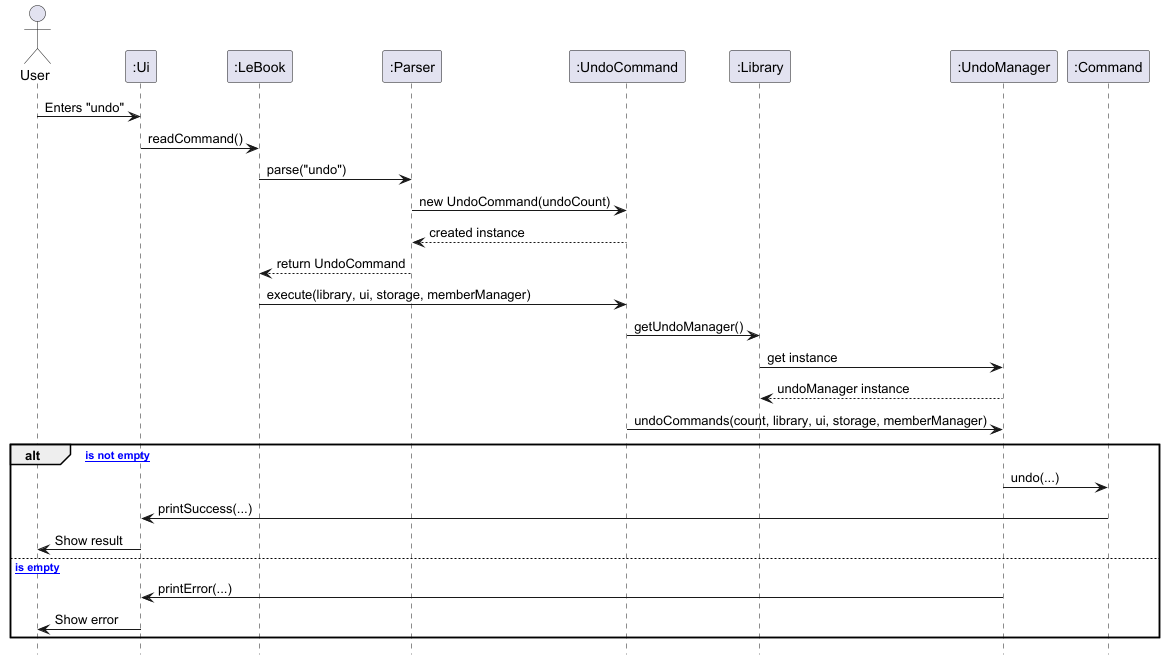
Undo Feature
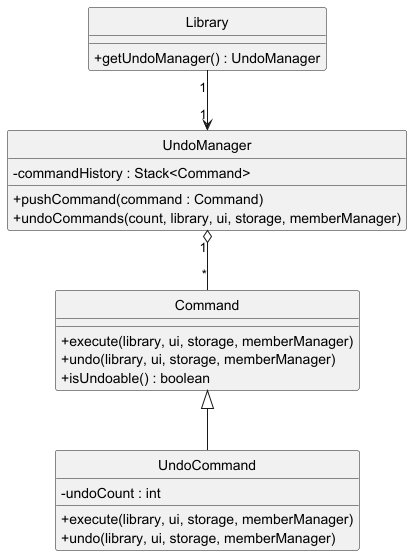
The Undo feature allows users to revert the effects of previous commands that modified the library’s state (add, delete, borrow, return).
It retrieves the command history from the UndoManager class which maintains a stack of executed commands and calls undo() method of the most recent undoable command.
The feature is facilitated by the following components:
UndoCommand: Command object encapsulating logic for performing undo operation.UndoManager: Responsible for storing and managing history of executed commands.Command: Abstract class that definesundo()method of all commands.Ui: DisplaysSUCCESSorERRORmessages after an undo operation is made.
Key Methods
undoCommands()inUndoManager:- Pops and undoes the specified number of undoable commands from the history stack.
- Displays error message in the event there are no undoable commands.
undo()inCommand:- Reverts changes made by command.
- Implemented by undoable commands, empty for non-undoable commands.
confirmUndo()inUi:- Prompts user for confirmation before undoing. Accepts only
y,Y,n,Nas inputs.
- Prompts user for confirmation before undoing. Accepts only
execute()inCommand:- Returns
booleanto indicate whether a command has been executed successfully. - Only successful commands are pushed onto the undo stack.
- Returns
Execution Flow
- User inputs string input
undo. Parserclass parses input and creates UndoCommand instance.- Execute method in UndoCommand calls
Library’sgetUndoManager()method. UndoManagerinvokesundoCommands()and checks command history.undo()method called for each undoable command to revert operation.Uidisplays success message if command was undone successfully or error message if no commands to undo.
Sequence Diagram
Load Book from File Feature
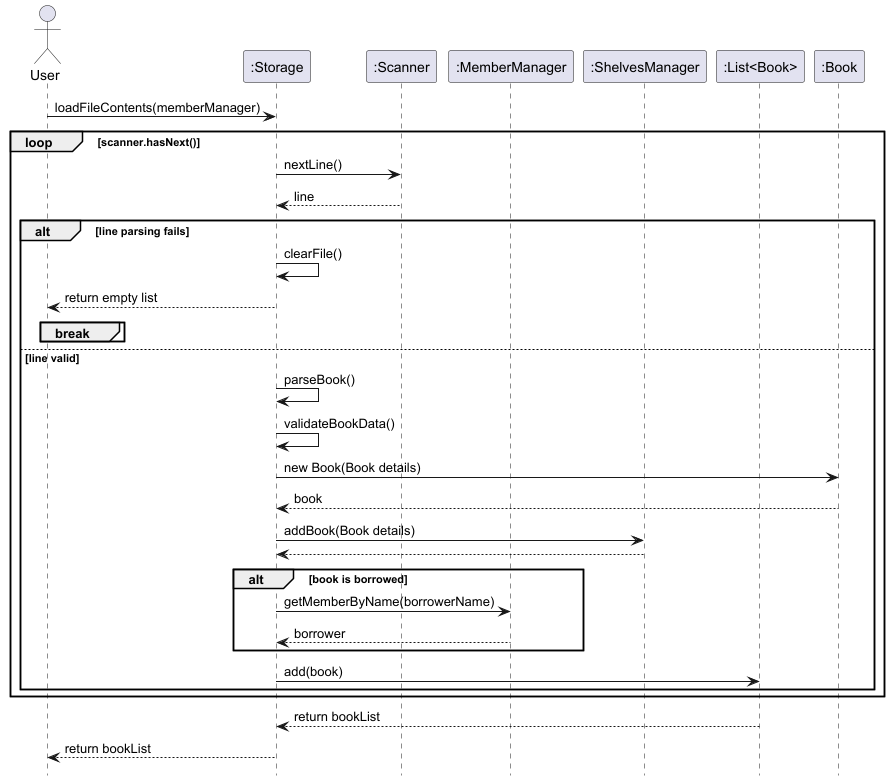
The Load Book from File Feature allows the user to keep and store the catalogue of books that are already present in the library.
It achieves this by scanning the LeBook_data.txt file.
Key Methods
handleCorruptedFile()inStorage:- When a file is tampered with,
Storagewill callhandleCorruptedFile(), which will clear out the text file through a method calledclearFile(). - It then displays an error message stating that the file is tampered with.
- Further, it displays that the file is cleared.
- When a file is tampered with,
Execution Flow
- User runs the program.
- The library gets populated with books through the use of
loadFileContents(). - The corresponding
Shelfgets populated in the process as well.
Sequence Diagram
Save Book to File Feature
The Save Book from File Feature is the counterpart to the Load Book from File. It allows the user to write to a text file as he/she executes commands.
Key Methods
toFileFormatinBook:- Converts the
Bookobject to a suitable String format to be saved as.
- Converts the
writeToFile()inStorage:- Write to the .txt file for future use.
Execution Flow
- User inputs a command.
- The
Commandobject calls thewriteToFile()method inStorage. - The
writeToFile()method calls a method in theBookclass to convert the object into an appropriate format to be saved.
Sequence Diagram
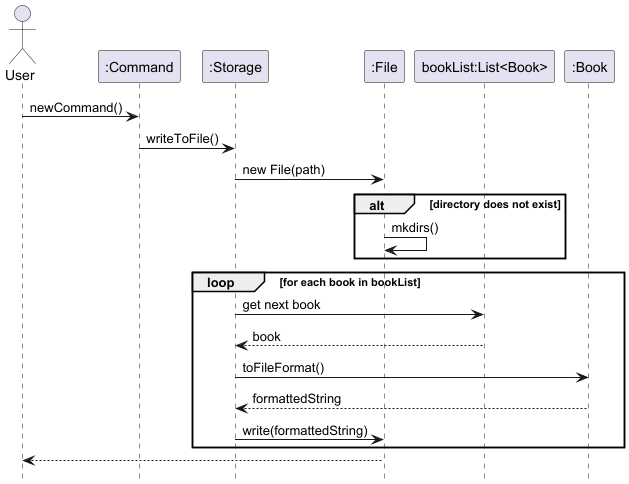
Here, the newCommand() invocation represents a new command that the user has input to the system.
Statistics Feature
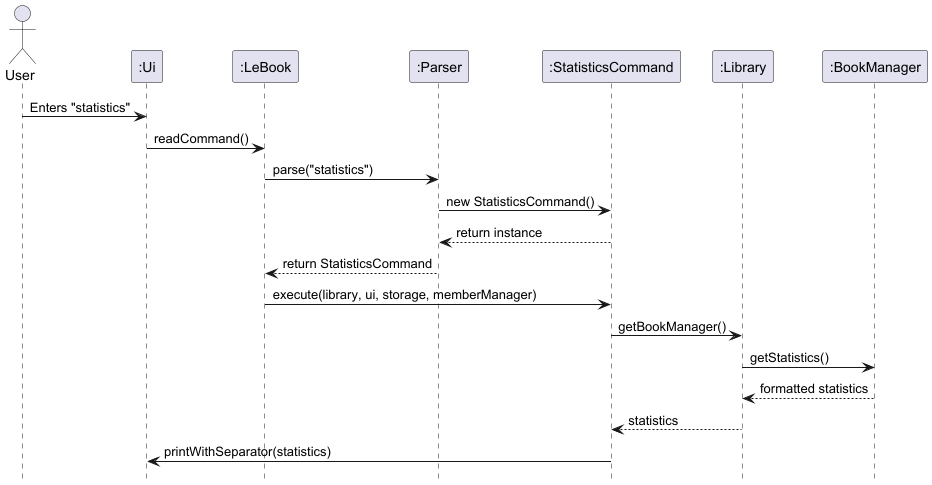
The Statistics feature allows librarians to get a quick overview of the library’s current status.
Statistics includes:
- Total number of books copies
- Total number of unique titles
- Total number of borrowed books
- Total number of books overdue
- List of unique book titles
The feature is facilitated by the following components:
StatisticsCommand: Command object encapsulating the logic for computing and displaying statistics.BookManager: Provides access to the full list of books and contains helper methods to compute statistics.Ui: Displays formatted statistics in a user-friendly format.
Key Methods
getStatistics()inBookManagerclass:- Calculates total book copies, number of unique titles and number of borrowed and overdue books.
- Returns a formatted string with all statistics included.
getUniqueTitleSize()andgetUniqueTitles()inBookManagerclass:- Compute count and set of unique book titles.
Execution Flow
- User inputs the command
statistics. - Parser parses the input and creates a StatisticsCommand instance.
execute()in StatisticsCommand callslibrary.getBookManager().getStatistics().- BookManager computes and returns the formatted statistics string.
- Ui prints the statistics for the user to view.
Sequence Diagram
Appendix
Product scope
LeBook is a comprehensive library management system that allows librarians to easily catalogue borrowed and returned books, streamlining inventory management and tracking book availabilities.
Target user profile
Library staff who wish to efficiently manage book collections.
Value proposition
Enables efficient cataloging, borrowing, and returning of books through a command-line interface, allowing librarians to manage inventory and track book availability quickly compared to a typical mouse/GUI driven app.
User Stories
| Version | As a … | I want to … | So that I can … |
|---|---|---|---|
| v1.0 | librarian | add new books to the system | keep track of the new arrivals. |
| v1.0 | librarian | delete a book | remove outdated or lost books. |
| v1.0 | librarian | see the list of all my books | see what books I have in the library. |
| v1.0 | librarian | record when members borrow a book | keep track when a book is borrowed. |
| v1.0 | librarian | record when members return a book | update its availability. |
| v1.0 | librarian | set due dates for my books | so that I can monitor when books will be returned and keep track of books that have yet to been returned. |
| v1.0 | librarian | save the book details | keep track of book statuses when using the system again. |
| v1.0 | librarian | enter the command as one long string | enter the input without caring about different parts of the input. |
| v1.0 | librarian | see what happens whenever I perform a command | confirm that my inputs have been added correctly. |
| v2.0 | librarian | view the list of all available commands | know what commands are available in the system. |
| v2.0 | librarian | know the genre of a book | better organise the catalogue. |
| v2.0 | librarian | keep track of what shelf a book is on | easily locate the book. |
| v2.0 | librarian | view the catalogue of a specific shelf | view available/missing/borrowed books on the shelf. |
| v2.0 | librarian | view a list of overdue books | follow up with contacting the appropriate member. |
| v2.0 | librarian | search for a book through keywords | find the appropriate book. |
| v2.0 | librarian | see the overall statistics of the library | know the total number of books, overdue books and borrowed books. |
| v2.0 | librarian | undo the last command | correct my actions if it was a wrong command. |
Non-Functional Requirements
- Should work on any mainstream OS that has installed Java 17 or above.
- Built to support only a single user.
Glossary
- Member - A person who visits the library to borrow or return a book(s).
- Mainstream OS - Windows, Linux, Unix, macOS.
Instructions for manual testing
Initial Launch
- Download the LeBook JAR file and copy it into an empty folder.
- Start the application by using
java -jar LeBook.jarin the terminal.
Adding a book
Adding a book while the library is empty
- Prerequisites: List all books using the
listcommand. No books in the list. - Test case:
add The Great Gatsby / F. Scott Fitzgerald / romance- Expected: Book is added to the library and the relevant shelf. Details of the added book shown in the status message. Library now contains 1 book.
- Test case:
add(without title, author and genre)- Expected: No book is added. Error details shown in the status message. Library remains empty.
- Other incorrect add commands to try:
add TITLEadd / AUTHORadd TITLE / AUTHOR(missing genre)add TITLE / AUTHOR /(missing genre value)- Expected: Similar to previous.
Deleting a book
Deleting a book while multiple books are listed
- Prerequisites: List all books using the
listcommand. Multiple books in the list. - Test case:
delete num / 1- Expected: First book is deleted from the list. Details of the deleted book shown in the status message. Library now contains fewer books.
- Test case:
delete num / 0- Expected: No book is deleted. Error details shown in the status message. Library remains unchanged.
- Test case:
delete bk / Harry Potter / J.K. Rowling(assuming this book does not exist in the library)- Expected: No book is deleted. Message shows that no such book is found.
- Test case:
delete id / R-0-0(assuming there’s a book with this bookID)- Expected: Book is deleted from the list. Details of the deleted book shown in the status message. Library now contains fewer books.
- Other incorrect delete commands to try:
deletedelete bk /(missing title)delete bk / TITLE(missing author)
Listing books
Listing books when the library is empty and when it contains multiple books
- Prerequisites: List all books using the
listcommand. Initially, no books in the list. - Test case:
list(with no books)- Expected: Message indicating that the library is empty.
- Test case:
list(after adding multiple books)- Expected: List displays all books with their status and details.
Borrowing a book
Borrowing a book when it is available
- Prerequisites: List all books using the
listcommand. At least one available book in the list. - Test case:
borrow 1 / Alice- Expected: Book is marked as borrowed. Status message indicates that the book has been borrowed. Book status changes to
[X]. - Return due date is set to 2 weeks from the date of borrowing.
- Expected: Book is marked as borrowed. Status message indicates that the book has been borrowed. Book status changes to
- Test case:
borrow 0 / Alice- Expected: No book is borrowed. Error details shown in the status message. Book status remains unchanged.
- Other incorrect borrow commands to try:
borrowborrow 1 /(missing borrower name)- Expected: Similar to previous.
Returning a book
Returning a borrowed book
- Prerequisites: List all books using the
listcommand. At least one borrowed book in the list. - Test case:
return 1- Expected: Book is marked as returned. Status message indicates that the book has been returned. Book status changes to
[ ]. - Return due date is reset and set to
null.
- Expected: Book is marked as returned. Status message indicates that the book has been returned. Book status changes to
- Test case:
return 0- Expected: No book is returned. Error details shown in the status message. Book status remains unchanged.
- Other incorrect return commands to try:
returnreturn x(where x is larger than the list size or the book is not borrowed)- Expected: Similar to previous.
Listing overdue books
Listing books whose return due date has been surpassed by the current date
- Prerequisites: List all overdue books using the
list overduecommand. Initially, no books are overdue. - Test case:
list overdue(with no overdue books)- Expected: Message indicating that there are currently no overdue books.
- Test case:
list overdue(after multiple books have surpassed overdue date)- Expected: List displays all overdue books with their status and details.
Listing borrowed books
Listing books that are currently borrowed
- Prerequisites: List all borrowed books using the
list borrowedcommand. Initially, no books are borrowed. - Test case:
list borrowed(with no borrowed books)- Expected: Message indicating that there are currently no borrowed books.
- Test case:
list borrowed(after multiple books have been borrowed)- Expected: List displays all borrowed books with their status and details.
Listing members with overdue books
Listing members who have overdue books, where the book title and author are also displayed
- Prerequisites: List all members with overdue books using the
list overdue userscommand. Initially, no members have overdue books. - Test case:
list overdue users(with no members having overdue books)- Expected: Message indicating that there are currently no members with overdue books.
- Test case:
list overdue users(after multiple members have overdue books)- Expected: List displays all members with overdue books.
Searching books
Searching books by various criteria (title, author, genre, bookID)
- Test case:
find title lord- Expected: List displays books with titles containing “lord”.
- Test case:
find author Tolkien- Expected: List displays books by authors containing “Tolkien”.
- Test case:
find genre adventure- Expected: List displays books with the genre “adventure”.
- Test case:
find id AD-0-0- Expected: List displays the book with the specified ID.
- Other incorrect find commands to try:
findfind title(missing term)find genre(missing term)- Expected: Similar to previous.
Viewing book quantity
Viewing the quantity of a specific book
- Test case:
quantity / Harry Potter / J.K. Rowling- Expected: Displays the quantity of the specified book.
- Test case:
quantity /(missing title and author)- Expected: Error details shown in the status message.
- Other incorrect quantity commands to try:
quantityquantity / TITLE(missing author)- Expected: Similar to previous.
Listing books on a shelf
Listing books on a specific shelf
- Test case:
shelf / romance / 1- Expected: List displays books on the specified shelf.
- Test case:
shelf(missing genre and shelf number)- Expected: Error details shown in the status message.
- Other incorrect shelf commands to try:
shelf / GENREshelf / SHELF_NUMBER- Expected: Similar to previous.
Viewing library statistics
Viewing the total number of book copies, unique titles, borrowed and overdue books, as well as the list of unique book titles
- Test case:
statistics- Expected: Displays library statistics.
Undo last valid command
Undoing the last command
- Prerequisites: There was a command executed previously.
- Test case:
undo(when the previous command wasadd,delete,borrow,return)- Expected: Last command is undone. Library state reverts to before the last command.
- Test case:
undo(other commands)- Expected: No command is undone. Error details shown in the status message.
Help command
Displays a help menu listing commands for the user to refer to.
- Test case:
help- Expected: Help menu of available commands is shown.
Exiting the application
Exiting the application
- Prerequisites: Application is running.
- Test case:
bye- Expected: Application closes with a goodbye message.
Additional test cases
- Invalid commands: Test various invalid commands (e.g.,
borrow,return,deletewithout specifying a book number) to ensure that the application responds correctly with error messages. - Edge cases: Test edge cases such as deleting books when the library is empty, borrowing or returning books that are not available or already borrowed, etc.
Handling missing/corrupted data files
To simulate a missing or corrupted data file:
- Delete or rename the data file used by LeBook.
- Run LeBook and attempt to perform operations.
BookID
A variable tied to a Book and is unique to every new Book added.
Format
[GENRE_CODE]-[SHELF_INDEX]-[SLOT_NUM]
Example: R-0-1
- R refers to 'Romance'
- '0' refers to Shelf 0
- '1' refers to Book 2
Expected behavior:
- LeBook should handle the absence or corruption of the data file gracefully.
- It should either create a new data file or display an error message indicating the problem.